
Creator Brief · Paid Collaboration

× GTA 6

Create a 60-second vertical video showing your audience how Framia can help turn GTA 6 gameplay into short-form clips.

FormatVertical 9:16
Length60 seconds
AudioVoiceover + music
LanguageEnglish
PlatformsReels · Shorts · TikTok
Publish byNov 30 (negotiable)
01 · About Framia

Who we are

Framia by Converge AI is a Creative Al agent - entirely Al automated creative director, no prompt needed, deliver pro-level marketing strategies and design & video content with automated ai agent skills and workflow canvas

Framia Logo

Official Account Tags

X / Twitter — https://x.com/framia_pro

How to Try Framia

Go to: https://framia.pro/

02 · What This Video Is

The idea

Create a 60-second vertical video for Instagram Reels, YouTube Shorts, or TikTok, showing your audience how Framia can help turn GTA 6 gameplay into short-form clips. Present it as a potential side-hustle idea for creators interested in GTA 6 content.

Core message

Start with a GTA 6 moment worth clipping. Run it through Framia. Get a finished vertical short with captions, voiceover and music — ready to post.

vertical 9:1660 secondsvoiceover + background musicEnglish
03 · Content Creation Guidelines

Suggested content directions

Creator Reference Video: https://www.instagram.com/reels/DfXbfSXPM3l/ · Tap any reference image to enlarge.

04 · Submission & Posting Requirements

Before you send us the video

Format: vertical 9:16 · 60 seconds · voiceover + background music · English. Please check each item below — your ticks are saved in this browser.

0 / 7 checked

Posting requirements

Thumbnail The Framia logo is visible and clear.
Pinned Comment "Try Framia with my link."
Include your unique Framia UTM link.
Description (YouTube only) Place the UTM link in the top 3 lines.
Title (YouTube only) Must include "Framia".
Bio Show your unique Framia UTM link.
Hashtags Required: #Framia #convergeai
Cross-platform Cross-platform posting is encouraged; please make native edits for each platform.

Timeline

Content Production StartMid-Nov.
Publication DeadlineNov. 30th
(negotiable)
Draft Review Turnaround2 business days
We aim to respond within 2 business days of draft submission.

IP & Rights

By participating in this collaboration, you agree that:

  • Framia may feature your project as a public template in the Framia template gallery (if needed).
  • Framia may showcase your project on its official social media accounts and website (if needed).
  • Framia may use your project as a reference in marketing materials. Your name and channel will be credited wherever your work appears (if needed).
  • You'll keep the video undeleted and unhidden on your account for at least 3 months after release.
  • You authorize Framia for content boosting (long-term authorization by default). If your content can't be boosted directly for any reason, Framia may forward and repost it on its official account.
  • GTA 6 context: Keep references descriptive and identify independent fan concepts. Avoid official-looking co-branding, copied game worlds or claims that Framia provides GTA 6 gameplay, accounts or early access.
05 · How we'll work together

Step by step

1

Pre-Collab

WHAT WE GIVE YOU

  • A Framia account — already logged in, with the GTA 6 project set up and ready. Open it and you can start filming.
  • A collaboration contract will also be sent to you , let's sign before any content work starts.

USING THE ACCOUNT

  • Use the campaign account we set up for you. Everything you need — the GTA 6 source footage, the demo clips and your own work — lives in that one account.
  • It's a shared account. So please leave the login as it is and keep it to yourself.
  • Please leave the setup as you find it. The GTA 6 source footage and the demo clips are the material you're filming, so keep their names and positions as they are.
  • If anything breaks, stop and ask. If you get logged out, hit an error, or a screen doesn't match this guide, just pause and message Jovin (Jovin@converge.ai).
2

Pre-Confirmation

Before filming, please share your creative plans with us for review and approval:

Outline / Script Submit your outline or script for our review. We'll confirm the content direction before you proceed to production.

3

Before Publishing

  • Video thumbnail
    Every influencer's thumbnail style varies, you can generate your own first version and we can help you generate a 2nd version. Make sure your thumbnail has a [Framia Logo].
  • URL link
    Only use the tracking URL we provide. Do not substitute with the product's main website or any other link.
  • Description & CTA
    Submit your video description and CTA copy for review before publishing. We'll help you rephrase and confirm the final version with you.

Q&A

How can I obtain pre-prepared accounts for content creation?

Reach out to Jovin (Jovin@converge.ai) for the account access, or anything in this document that does not match what you see on your screen.

Why the live prompt will not finish on camera — and what to do about it

This part surprises everyone the first time they see it, so we are telling you up front.

Framia runs on its own servers, and YouTube currently blocks automated downloads from those servers ("Sign in to confirm you're not a bot").

What to do in your recording: type the prompt, let it run for two or three seconds, then stop recording this shot and cut to Part 2. Do not stay on the screen any longer than that — the YouTube block screen shown above must not appear in your video; it is only there to explain why we cut.
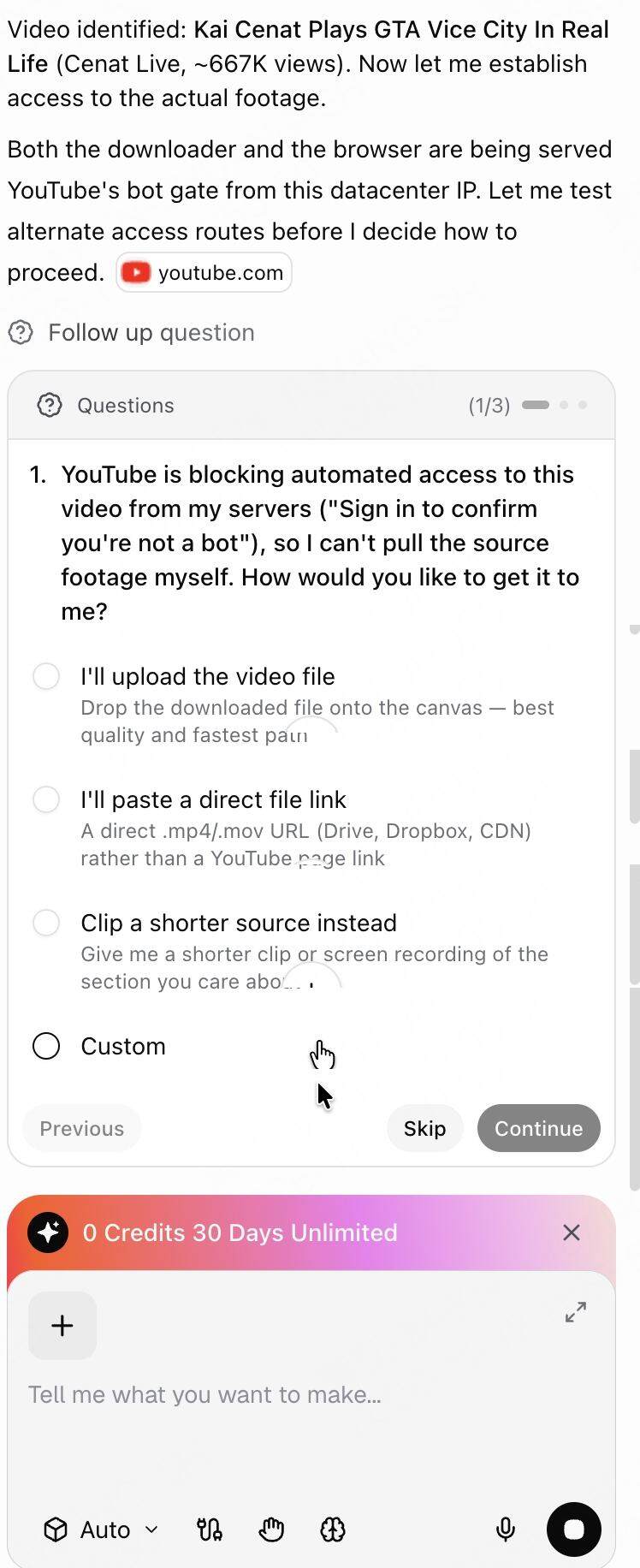
YouTube block screen
QUESTIONS?
Message Jovin anytime
Jovin@converge.ai
Build with Enter